What does an interactive board do?

Interactive Whiteboard News

What does an interactive board do?

2025-12-10

Qtenboard Interactive Board: The Future of Learning & Collaboration

Imagine walking into a modern classroom or a bright, spacious corporate meeting room. The teacher or presenter approaches the wall-mounted display, touches the screen with a simple gesture, and instantly, a world of possibilities unfolds. Gone are the days of chalk dust, dim projectors, or cumbersome setups with laptops and cables. This is the power of an interactive board. But what exactly does an interactive board do, and why has it become an essential tool for education and corporate collaboration? In this article, we dive deep into the functions, applications, and unique advantages of Qtenboard interactive boards, the next generation of smart display technology.

What does an interactive board do?

1. The Interactive Board: From Chalk to Smart Technology

Classrooms and offices have long relied on traditional tools. In schools, blackboards and chalk were once the standard. In corporate settings, projectors and flip charts dominated. While these tools served their purpose, they came with limitations. Chalk caused dust, projectors required dim lighting, and flipping pages or switching devices interrupted the flow of teaching or meetings.

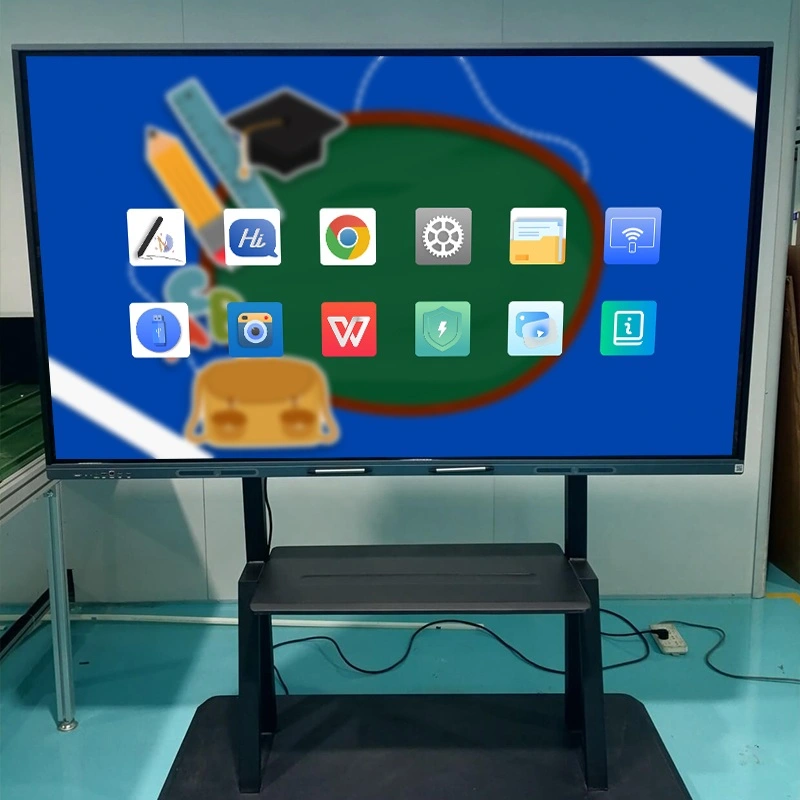
The arrival of the interactive board changed everything. Today, Qtenboard interactive boards integrate multiple functions into a single device, combining high-definition displays, touch interactivity, audio systems, computing power, and intelligent software. They are not just screens—they are interactive hubs where ideas, knowledge, and collaboration come to life.

2. Multi-Touch Functionality: Engage Everyone in Real Time

At the heart of every interactive board is its multi-touch capability. Unlike traditional whiteboards, where only one person can write at a time, Qtenboard interactive boards allow multiple users to interact simultaneously. Teachers can annotate lessons while students solve problems directly on the board. In corporate meetings, multiple team members can highlight, draw, and comment on presentations, fostering an environment of active collaboration.

Imagine a science class where a teacher opens a periodic table, a molecular diagram, and a simulation video all at once. Students can tap the screen to rotate molecules, add notes, or answer quiz questions in real time. This level of engagement is impossible with traditional teaching tools. Interactive boards make learning immersive and participatory, keeping attention focused and minds active.

3. 4K High-Definition Display: Crystal Clear Visuals

A picture is worth a thousand words, and a Qtenboard interactive board delivers thousands of words in vivid detail. With 4K LCD display technology, text, images, and videos are rendered with exceptional clarity. Unlike projectors that struggle in bright rooms, the interactive board remains bright and legible even in well-lit classrooms or conference halls.

Qtenboard offers a wide range of sizes, from 55 inches to a massive 110 inches, ensuring every student or participant has a clear view. The high-resolution display allows fine details to be visible, whether it’s a detailed anatomy diagram, a financial chart, or a high-definition video demonstration. Clear visuals improve comprehension, reduce eye strain, and make presentations more engaging.

4. AI Integration: Smarter Teaching and Meetings

Modern interactive boards are more than just touchscreens—they are intelligent assistants. Qtenboard incorporates advanced AI features that enhance productivity and interaction:

  • Speech-to-Text: Transcribe lectures or discussions in real time, making note-taking effortless.
  • Meeting Minutes: Automatically generate accurate minutes during corporate meetings.
  • Q&A Assistance: Interactive question-and-answer support for classrooms and workshops.
  • Smart Assistant: Offers navigation, suggestions, and automated tasks to streamline operations.

For example, during a live math lesson, the AI can suggest hints for students struggling with problems, while in a corporate meeting, it can highlight key points and generate actionable summaries instantly. These features save time, enhance learning, and make meetings more effective.

5. Natural Writing Experience: Smooth, Pressure-Sensitive, and Accurate

Writing on a Qtenboard interactive board is almost indistinguishable from writing on paper. The board supports:

  • Zero-latency writing, so every stroke appears instantly.
  • Pressure-sensitive input, allowing lines to thicken or thin based on pen pressure.
  • Shape-aware erasing, recognizing pen size and erasing only what is intended.
  • Ultra-low touch recognition (0.5mm), preventing accidental marks.

This makes interactive boards perfect for subjects like mathematics, engineering, or design, where precise writing and drawing are essential. Multiple students can collaborate simultaneously without interference, and teachers or presenters can save and share content effortlessly.

6. Seamless Connectivity: Wireless Projection and Multi-Device Integration

The modern classroom and office require flexible connectivity. Qtenboard interactive boards allow:

  • Wireless projection from laptops, tablets, or smartphones (iOS and Android).
  • Reverse touch control, enabling presenters to control their computers directly from the board.
  • Multi-user file sharing via FTP, OneDrive, Google Drive, or local accounts.
  • Fast file transfer and content sharing, ensuring that lessons or presentations flow smoothly.

Whether teaching a lecture, leading a brainstorming session, or hosting a remote conference, interactive boards eliminate the technical hurdles of traditional setups, making collaboration seamless and natural.

7. Remote Collaboration: Breaking Geographical Barriers

With remote work and e-learning becoming mainstream, the interactive board has proven invaluable. Qtenboard interactive boards support real-time remote interaction. Students from different locations can participate in lessons, and teams across continents can join meetings without compromise.

Imagine a multinational company planning a product launch. Teams in New York, London, and Singapore can simultaneously annotate a single board, make adjustments, and instantly see changes reflected for everyone. This level of interactivity fosters engagement and ensures alignment across time zones.

8. Comprehensive Security and Management

Security and management are crucial in both education and business. Qtenboard interactive boards offer:

  • USB locks, HDMI locks, screen locks, pattern locks, and APK installation locks, protecting sensitive content.
  • Device Management System (DMS) for scheduled power on/off, remote upgrades, operation logs, early warnings, information sending, and application management.

These features ensure that interactive boards remain reliable, secure, and easy to maintain, giving IT staff and educators peace of mind.

9. Practical Applications: Real-World Impact

In the Classroom

Teachers can display interactive lessons, annotate, and receive instant feedback. Tools for subjects like science, music, math, and language arts make lessons engaging and interactive. Students can participate actively, making learning memorable and effective.

In Corporate Meetings

High-definition visuals, multi-user annotation, and AI-powered tools enhance productivity. Teams can brainstorm, review analytics, and generate meeting summaries instantly. Remote participants can contribute seamlessly, eliminating the limitations of traditional conferencing.

In Training and Workshops

Trainers can illustrate complex processes, save and share content instantly, and provide interactive exercises. Learners engage more deeply, improving retention and comprehension.

10. Advantages of Qtenboard Interactive Boards

  • Efficiency: One device replaces multiple traditional tools.
  • Engagement: Multi-user interaction keeps participants active.
  • Safety: Low blue-light, anti-glare LCD protects eyes.
  • AI Empowerment: Automates tedious tasks and enhances productivity.
  • Versatility: Suitable for classrooms, boardrooms, and training sessions.
  • Scalability: Multiple sizes, flexible installation options.

Conclusion: The Interactive Board is the Future

The evidence is clear. Interactive boards like Qtenboard are transforming education and corporate collaboration worldwide. By combining high-definition displays, multi-touch interactivity, AI features, secure management, and seamless connectivity, Qtenboard interactive boards provide an unmatched experience.

Whether in a classroom, office, or training room, investing in a Qtenboard interactive board ensures engagement, efficiency, and future-proofed collaboration. In today’s fast-evolving world, an interactive board is not merely a tool—it is the cornerstone of modern learning and teamwork.

Click to read the product details and learn about its functional features and actual performance.

📖 Read Product

အိမ်း Whatsapp စာရင်းမှတ် ဥပမာ ၊